Most data teams start by hand-building a pipeline for each new source. It works, until there are fifty of them, each with its own quirks, logging and failure handling. A metadata-driven ETL framework takes a different approach: you describe each source in configuration, and one well-tested engine does the work.
This article explains how these frameworks work, what they're good for, and when they're worth building.
What is a metadata-driven ETL framework?
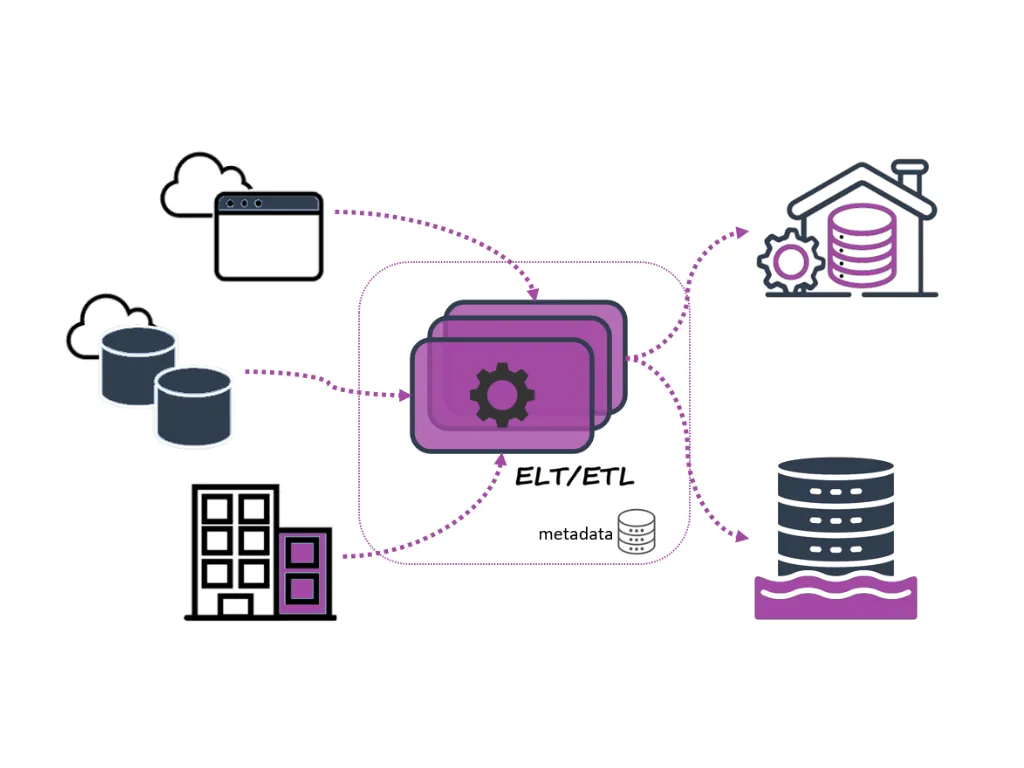
ETL stands for extract, transform and load: moving data from source systems, reshaping it and loading it into a warehouse or lakehouse. In a metadata-driven framework, the details of each load (where the data comes from, which tables and columns, how often, what to check) are stored as metadata rather than written into code. A small number of generic pipelines read that metadata and run accordingly.
A typical framework has four parts:
- Metadata repository: a table or configuration store describing every source, object, schedule, load type (full or incremental) and data quality rule.
- Metadata extractor: reads source system catalogues to discover tables and columns, so new objects can be added with little manual effort.
- Metadata manager: keeps the configuration versioned and valid, and records what ran, when, and with what result.
- Execution engine: generic pipelines, for example in Azure Data Factory, Microsoft Fabric or Databricks, that loop over the metadata and process each object the same way.
Why teams use them
- Speed: adding a new source becomes a configuration change measured in hours, not a new build measured in days.
- Consistency: every load gets the same logging, retries, auditing and data quality checks, because they all run through the same code.
- Scalability: going from ten sources to hundreds doesn't multiply the code you have to maintain.
- Lower running cost: fewer bespoke pipelines means less to test, fix and hand over.
How Microsoft documents the pattern
Azure Data Factory's copy data tool can generate this pattern for you, and its documentation is a useful reference design. It's aimed at exactly the case these frameworks suit: copying very large numbers of objects (thousands of tables, for example) or loading from a wide variety of sources.
- A control table: one row per object to copy, holding its source and destination settings, column mapping, whether it's a full or incremental (delta) load, a priority, and a flag to switch it on or off. Adding or removing an object means updating this table, without redeploying any pipeline.
- Three levels of pipeline: a top-level pipeline counts the objects and splits them into batches based on how many copies may run at once (20 by default). A middle level splits each batch into groups. A bottom level copies each object, choosing a full or incremental load for it.
- Incremental loads with a watermark: for a delta load, the pipeline finds the highest value of a watermark column, such as a last-modified timestamp, copies only the rows changed since the previous run, and writes the new value back to the control table for next time.
The documentation also lists limitations worth knowing before you design your own. Some settings, such as the database type and file format, can't be parameterised, so loading from both Oracle and SQL Server needs two sets of pipelines, though they can share one control table. Incrementally loading only new files from file storage isn't supported by the generated pipelines.
For new work, Microsoft now positions Data Factory in Microsoft Fabric as the next generation of Azure Data Factory, so it's worth considering there first. The design principles are the same.
Where they work well
- Data warehousing and lakehouses: landing many source tables into a medallion architecture (bronze, silver, gold) with standard incremental loads.
- Business intelligence: keeping the data behind Power BI reports fresh and trustworthy, with clear lineage of what loaded when.
- Data migration: moving many objects from a legacy platform with repeatable, auditable loads and reconciliation.
- SaaS integrations: pulling data from APIs such as HR and payroll systems on a schedule. Our Employment Hero integration is an example.
Design tips from experience
- Log every run to a table: object, start and end time, rows read and written, outcome and error. It's the first place you'll look when something goes wrong.
- Choose watermark columns carefully. They must change whenever a row changes. If a source can't guarantee that, schedule periodic full loads as a safety net.
- Keep secrets out of the metadata. Store connection names in configuration and the credentials themselves in a key vault.
- Version the configuration like code, with review before changes reach production.
When not to build one
If you only have a handful of stable sources, a framework can be more machinery than you need. They pay off when sources are numerous, change often or follow similar patterns. Whatever you choose, keep transformation logic that's genuinely unique (complex business rules, for example) in clearly owned, tested code rather than forcing it into configuration.
Getting started
- List your sources and group them by pattern, such as database tables, files or APIs.
- Design the metadata model and the standard load types you need.
- Build the generic pipelines once, with logging, retries and data quality checks built in.
- Onboard sources in waves, and track run history and failures in a simple dashboard.
We design and build metadata-driven frameworks on Azure Data Factory, Microsoft Fabric and Databricks. Talk to our data engineering team about yours.