Consumption pricing is wonderful, right up until the bill arrives. Data platforms are now among the fastest-growing lines on many cloud invoices, and for a good reason: their cost grows with success. More data, more users, more reports and, lately, more AI.
FinOps is how you stay in control without slowing that success down. It isn't about spending less at any cost. It's about knowing what you spend, why, and what you get for it, so every dollar on your data platform earns its keep.
Key takeaways
- FinOps is a shared practice across engineering, finance and the business, not a one-off cost-cutting exercise.
- Data platform spend leaks through idle compute, oversized capacity, unused refreshes and duplicated data.
- Every platform has a few big levers: auto-suspend, right-sizing, workload separation and tagging.
- Track a unit cost, such as cost per active user, so cost conversations become value conversations.
- Start with visibility and ownership. Optimisation sticks only when someone owns the number.
What is FinOps?
The FinOps Foundation describes FinOps as an operational framework and cultural practice that maximises the business value of cloud, through timely, data-driven decisions and shared financial accountability between engineering, finance and business teams.
In practice, it works as a loop with three phases:
Teams move through these phases again and again, getting a little more mature each time. The FinOps Foundation calls the stages of maturity Crawl, Walk and Run, and you'll find a quick self-check for each phase further down.
Why data platforms need FinOps of their own
Traditional cloud cost management focuses on servers. Data platforms are different. Their cost is driven by workloads: queries, pipelines, report refreshes, notebooks and AI calls. Much of it runs on shared capacity, so it's hard to say which team or product caused it. And because it's so easy to spin up another warehouse, workspace or copy of a dataset, spend tends to creep rather than jump, which makes it easy to miss.
Where data platform spend leaks
These are the leaks we see most often when we review data platforms. Most have simple fixes.
Always-on compute
Clusters, warehouses and capacities that run when nobody is using them.
FixAuto-suspend, auto-termination and scheduled pausing.
Oversized capacity
Sized for the busiest day of the year, paid for every day.
FixRight-size regularly, scale up for peaks and back down after.
Refreshing what nobody reads
Reports and pipelines refreshing every hour for an audience of none.
FixCheck usage, then reduce frequency or retire them.
Copies of copies
The same data stored and processed in several places.
FixOne governed copy, shared rather than duplicated.
Forgotten environments
Development and test workspaces left running after a project ends.
FixOwners, expiry dates and automatic shutdown.
Inefficient processing
Full reloads and unoptimised queries that do far more work than needed.
FixIncremental loads, partitioning and query tuning.
No tags, no owner
Spend nobody can explain, so nobody acts on it.
FixTag everything to a team, project or product.
Unplanned AI usage
Usage-based AI services adopted faster than anyone is tracking.
FixQuotas, budgets and usage reporting from day one.
Check your FinOps maturity
Answer nine quick questions. Your results update as you go, with a fix list built from your answers. Nothing is sent anywhere.
Your results
Answer the questions to see where you stand.
Your fix list
Your biggest cost levers, platform by platform
Every platform bills differently, but each has a handful of levers that make most of the difference. Choose a platform:
- Size the capacity to real usageUse the Fabric Capacity Metrics app to see how much of your capacity you actually use, then resize the F SKU to match.
- Pause what you don't needCapacities bought pay-as-you-go can be paused and resumed, for example for development capacities outside business hours.
- Reserve what you'll always useIf a capacity runs all year, reserved capacity pricing costs less than pay-as-you-go.
- Tame refreshesSemantic model refreshes and pipelines consume capacity. Refresh only as often as people need, and refresh incrementally.
- Separate noisy workloadsPut heavy engineering and critical reporting on different capacities, so one can't throttle the other.
- Auto-terminate clustersSet short auto-termination times on interactive clusters, so idle compute stops billing.
- Use jobs compute for scheduled workRun scheduled pipelines on jobs compute rather than all-purpose clusters, which have a higher DBU rate.
- Enforce cluster policiesLimit instance types, sizes and maximum workers, and require cost tags, through cluster policies.
- Read the billing system tablesQuery the billing usage system tables to see DBU consumption by workspace, job, cluster and tag.
- Consider spot and serverlessSpot instances suit fault-tolerant jobs, and serverless removes idle time for bursty SQL and job workloads.
- Set short auto-suspend timesWarehouses bill per second while running, with a 60-second minimum each time they resume. Suspend them quickly when idle.
- Right-size warehousesEach size up doubles the credits per hour. Start small, and scale up only when queries really need it.
- Use resource monitorsResource monitors notify, or suspend warehouses, when credit usage reaches the limits you set.
- Watch serverless featuresSnowpipe, automatic clustering and materialised views use credits too. Check them in the account usage views.
- Tag queries and objectsQuery tags and object tags let you attribute credits to teams, workloads and data products.
- Budgets and alertsSet budgets in Azure Cost Management, with alerts to owners before spend runs over.
- Tag for ownershipTag resources by team, environment and product, and enforce the tags with Azure Policy.
- Commit where it's predictableReservations and savings plans reduce the cost of steady workloads such as databases and virtual machines.
- Use your licencesAzure Hybrid Benefit lets eligible Windows Server and SQL Server licences reduce Azure costs.
- Tier your storageLifecycle rules move older data to the cool, cold or archive tiers automatically.
Running Synapse dedicated SQL pools? Get our free auto-pause script.
Not sure which platform suits your workload and budget? Our Fabric vs Databricks vs Snowflake guide compares their pricing models side by side.
Auto-pause idle Azure Synapse dedicated SQL pools
A dedicated SQL pool is billed for compute every hour it's online, whether or not anyone is running queries. When it's paused, you pay only for storage. Our consultants built this PowerShell runbook to pause idle pools automatically, and we've made it free to use.
- 1Runs on a scheduleAs an Azure Automation runbook, signed in with a managed identity, so there are no passwords to store.
- 2Finds every poolScans all Synapse workspaces in the subscription and checks each online dedicated SQL pool.
- 3Checks for real activityReads the pool's query history, ignoring its own and internal system activity.
- 4Pauses only idle poolsPauses pools idle for longer than your threshold (30 minutes by default) and leaves busy ones alone.
- Never pauses a pool with running or queued queries
- Leaves a pool untouched if it can't check it
- Dry run with
-WhatIf - Least-privilege permissions
- Fails the job, so alerts fire, if anything goes wrong
- Works with private networking via a Hybrid Runbook Worker
.\Suspend-IdleSynapseSqlPools.ps1 -SubscriptionId '<your-subscription-id>' -Action Suspend -WhatIf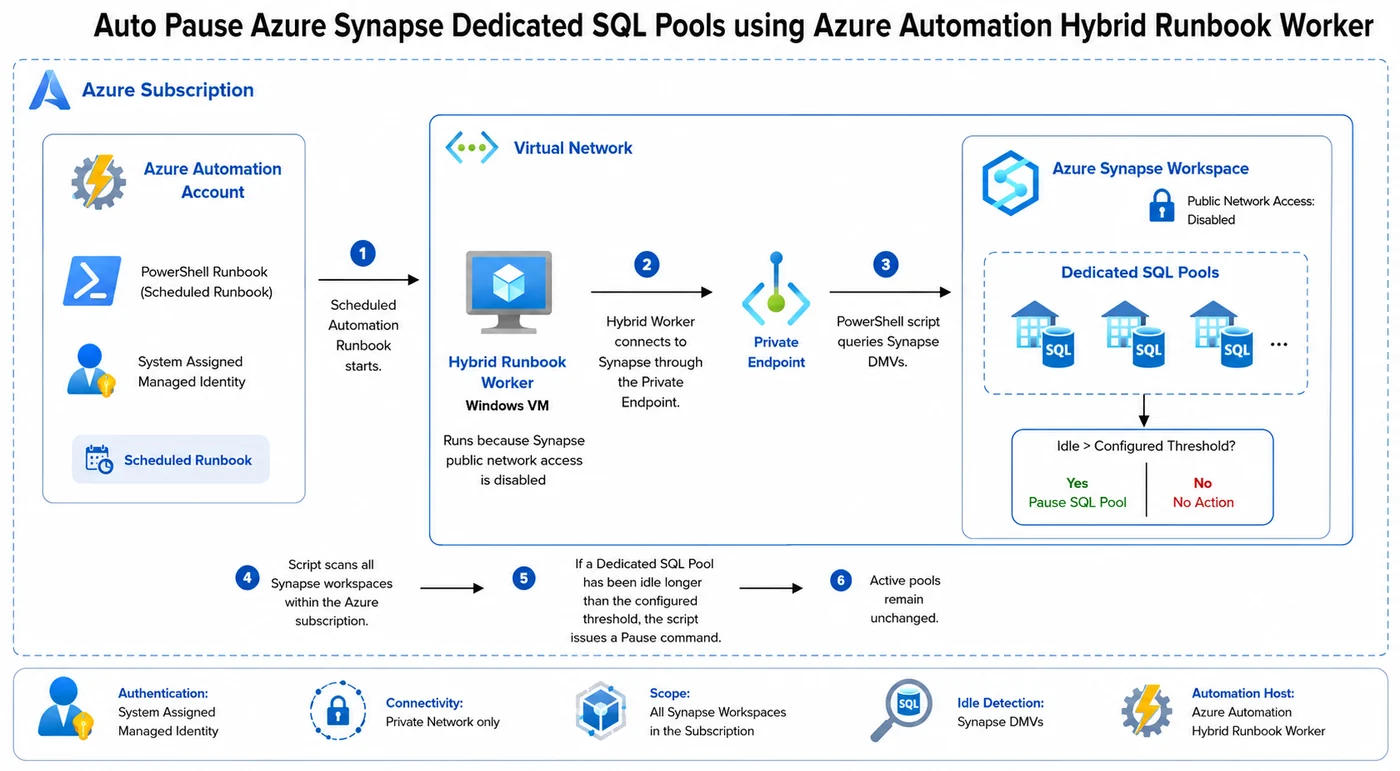
You'll need: an Azure Automation account with the Az.Accounts, Az.Synapse and SqlServer modules, the Synapse Contributor role on your workspaces, and VIEW DATABASE STATE on each pool for the managed identity. Full details are in the script header.
Free and open source under the MIT licence. Test it in a non-production subscription first.
Unit economics: the number that changes the conversation
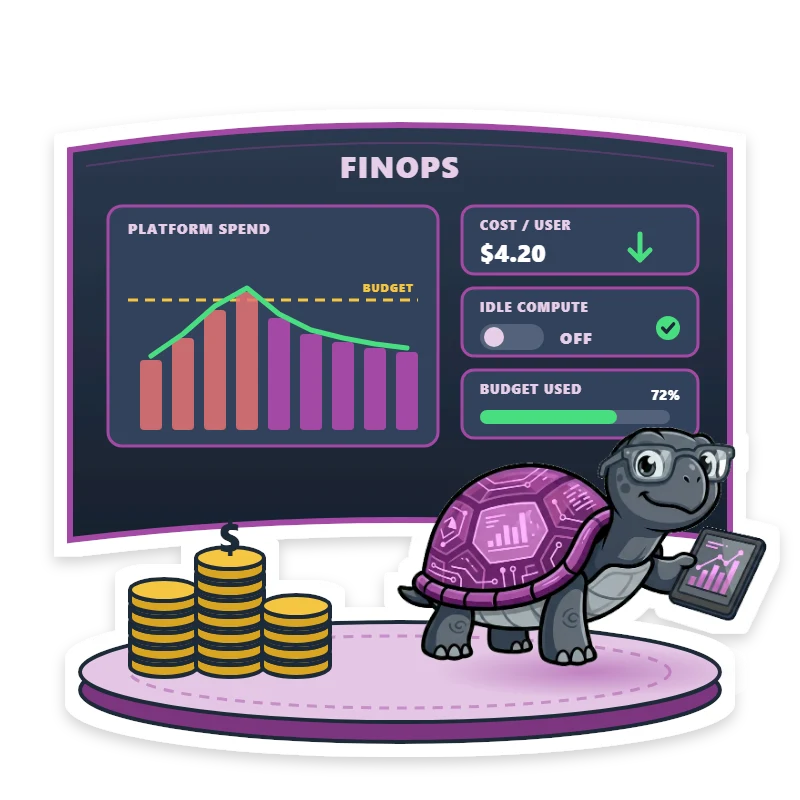
"We spent $40,000 on the data platform last month" starts an argument. "It cost $4.20 per active user, down from $5.10" starts a conversation about value. A unit cost connects spend to what the business gets, so growth in spend is fine as long as the unit cost holds or falls.
Try it with your own numbers. Nothing leaves your browser.
Illustrative only. The result depends entirely on the numbers you enter.
A practical 90-day FinOps plan for data teams
- Days 1 to 30, Inform: tag workspaces, warehouses and clusters to owners, build a simple monthly cost report by team, and choose one unit cost to track.
- Days 31 to 60, Optimise: switch on auto-suspend and auto-termination, right-size the biggest capacities, and retire or slow down unused refreshes and pipelines.
- Days 61 to 90, Operate: set budgets and alerts, give every resource a named owner, and start a short monthly cost review with technology, finance and the business.
After 90 days, take the maturity check again. Moving one phase from Crawl to Walk is real progress.
Frequently asked questions
What is FinOps?
FinOps is a practice that brings engineering, finance and business teams together to manage cloud costs. The FinOps Foundation describes it as an operational framework and cultural practice that maximises the business value of cloud through timely, data-driven decisions and shared financial accountability.
Is FinOps just about cutting costs?
No. The aim is more value for every dollar. Sometimes that means spending less, and sometimes it means spending more on the workloads that matter, with a clear view of what you get in return.
Who should own FinOps in a data team?
Everyone shares it, but someone should lead it. Engineers own the efficiency of what they build, finance owns budgets and forecasting, and business owners decide which outcomes are worth paying for. A named platform owner usually brings these together.
How quickly can we see results?
Quick wins such as auto-suspend settings, removing unused refreshes and shutting down idle environments can reduce spend within weeks. Lasting results come from visibility, ownership and a regular review rhythm.
Do FinOps principles apply to AI workloads?
Yes. AI services are usually priced by usage, such as tokens or provisioned throughput, so the same habits apply: tag usage to an owner, set quotas and budgets, monitor consumption and measure cost against the value delivered.
Want a second pair of eyes on your cloud bill?
Our fixed-scope Azure Cloud Cost Review finds the quick wins and the structural fixes across your data platform, and our managed services keep costs in check month after month.