Security is one of the most critical pillars of any enterprise data platform. As organisations centralise data from multiple sources and enable broader access for analytics and AI, protecting that data becomes increasingly important. A well-designed security model is not just about preventing unauthorised access, it is about ensuring the right people have the right level of access, safeguarding sensitive information, meeting regulatory requirements, and maintaining trust in the platform. In this article, we'll explore the key security elements that help build a secure, resilient, and well-governed enterprise data platform using Microsoft Fabric.
Think of Microsoft Fabric as a rented, fully-managed data analytics building. Instead of you buying land, installing locks, hiring security guards, and maintaining the building, Microsoft does all of that for you. You just configure the settings to match your company's rules.
Inbound and outbound network security
Network security in an enterprise data platform can be viewed from two perspectives: inbound and outbound connectivity.
- Inbound network security controls who and what can access the platform, helping ensure that only trusted users, devices, or networks can connect.
- Outbound network security, on the other hand, governs how the platform communicates with external services, restricting data movement to approved destinations and reducing the risk of data exfiltration.
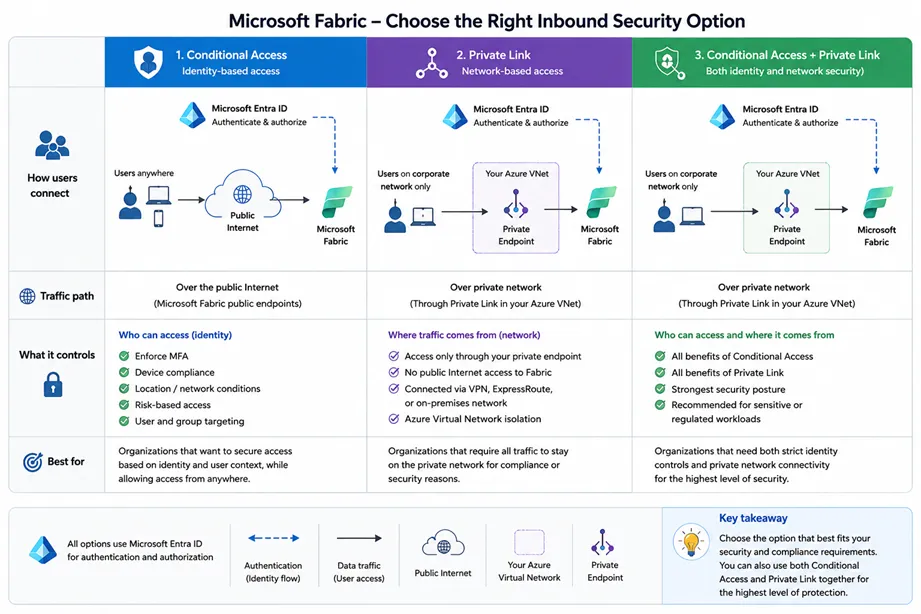
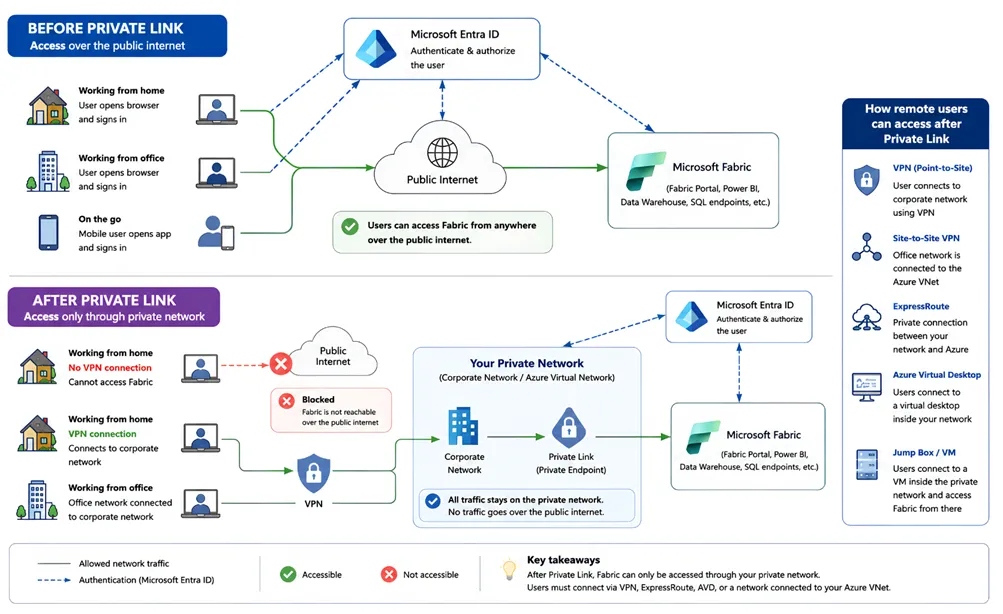
Together, these controls reduce the platform's attack surface, strengthen data protection, and support a Zero Trust security approach. The following illustration explains the options available to secure your workspaces from the inbound traffic.
Private Link and private endpoints
A Private Link is the technology/platform that enables Private Endpoints and Private Link Services. A Private Endpoint is a network interface inside your subnet that gives an Azure PaaS service (e.g., Storage, SQL) a private IP from your VNet.
By default, Microsoft Fabric is accessed over the public internet. Although access is protected by strong identity and security controls such as Microsoft Entra ID, Multi-Factor Authentication (MFA), and Conditional Access, the service remains reachable through its public endpoints. Enabling Private Link changes this by providing private connectivity between your network and Microsoft Fabric over the Microsoft backbone network. This removes the need for public internet access to Fabric, significantly reducing the attack surface while allowing organisations to enforce stricter network isolation without changing the user experience for authorised users.
Admin settings for inbound network access
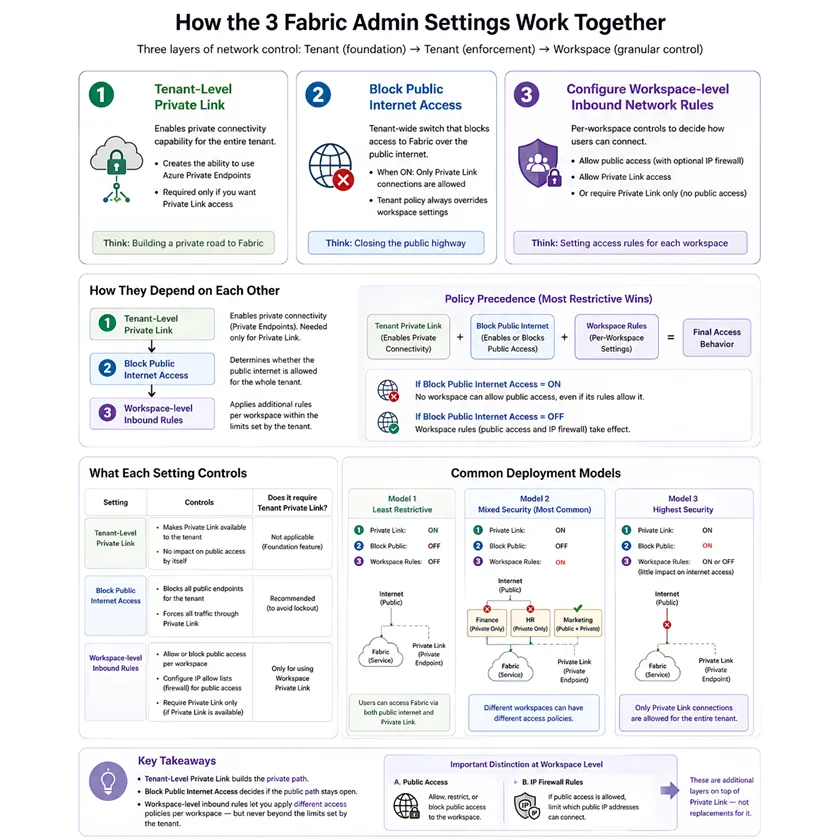
Microsoft Fabric provides three key admin settings that work together to control inbound network access to the platform:
- Tenant-Level Private Link establishes private connectivity between your organisation's network and Microsoft Fabric.
- Block Public Internet Access prevents users from accessing Fabric through its public endpoints, ensuring connections occur only through approved private network paths.
- Configure Workspace-Level Inbound Network Rules allows administrators to define network access policies for individual workspaces, enabling different levels of protection based on business, security, or compliance requirements.
Together, these settings provide a flexible, layered approach to securing inbound access while allowing organisations to adopt network isolation at their own pace.
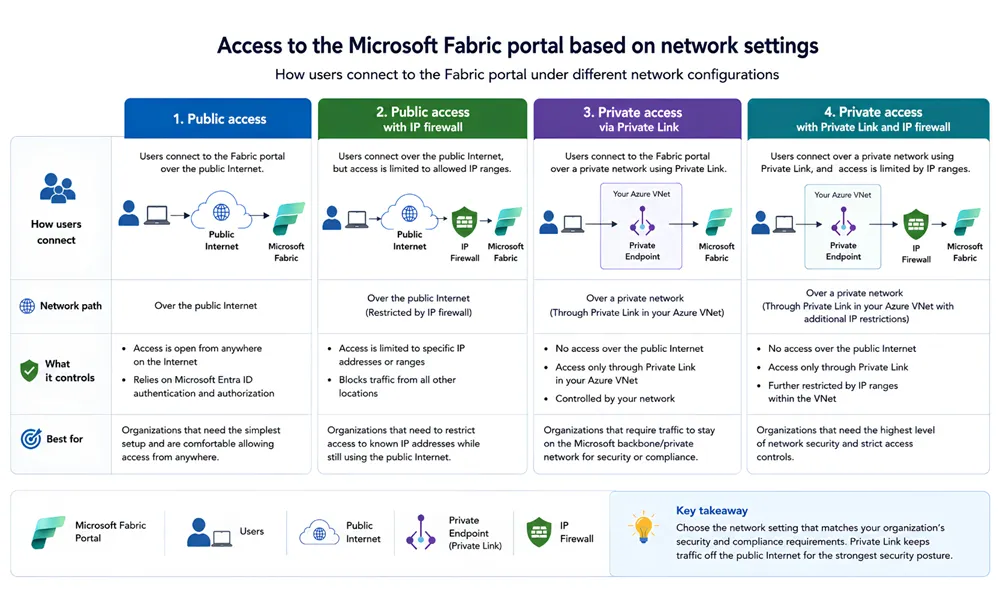
Access to the Fabric portal
Access to the Microsoft Fabric portal depends on how an organisation's network security settings are configured. Organisations can choose to allow access over the public internet, restrict access to specific workspaces, or require all connections to use private network paths through Private Link. As these settings become more restrictive, users must connect from approved networks to access the portal and its resources. This flexible approach allows organisations to balance accessibility with security, implementing the level of network protection that best aligns with their business and compliance requirements.
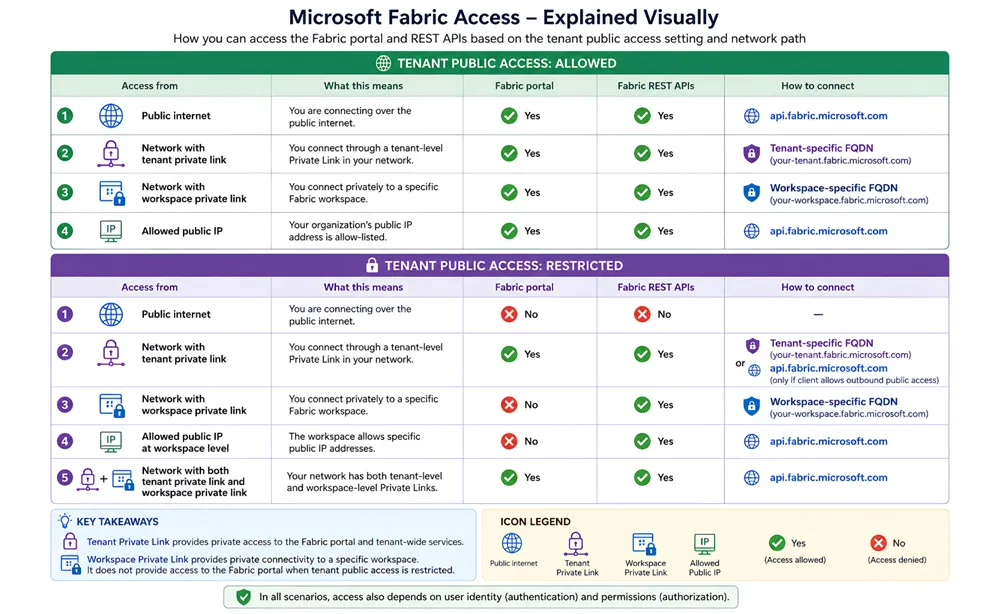
Blocking public internet access
The Block Public Internet Access setting prevents users and applications from accessing the Microsoft Fabric portal and its public APIs over the internet. Once enabled, requests made through Fabric's public endpoints are denied, requiring users to connect through approved private network paths, such as a configured Private Link. This significantly reduces the platform's exposure to the public internet, helping organisations enforce stricter network isolation while continuing to rely on Microsoft Entra ID and other identity-based security controls for authentication and authorisation.
Considerations for private endpoints
There are several considerations to keep in mind while working with private endpoints in Fabric. Private Link is a security feature, not a feature-enablement feature. The limitations are intentional because some Fabric features currently depend on Microsoft services that still communicate over public endpoints. Microsoft is gradually adding Private Link support to more services.
A few examples from Microsoft's documentation at the time of writing (October 2026) show why it's worth reviewing the full list before switching Private Link on:
- The on-premises data gateway isn't supported when Private Link is enabled. The virtual network data gateway is the supported alternative.
- Private Link doesn't work with trial capacities.
- Publish to web isn't supported when the Azure Private Link tenant setting is enabled.
- Copilot isn't currently supported for Private Link or closed network environments.
- Private endpoints secure traffic into Fabric. They don't secure traffic from Fabric to your external data sources, which needs its own firewall and network rules.
What's next?
This article focuses on inbound network security in Microsoft Fabric. In a separate upcoming article, we'll explore outbound network security, including how Microsoft Fabric securely connects to external services, controls outbound traffic, and helps organisations reduce the risk of data exfiltration while enabling secure access to the resources their workloads depend on.
Need help securing your data platform?
At DATA LEAGUE, we help organisations design and implement secure, well-governed data platforms on Microsoft Fabric. Contact us to discuss how we can help you strengthen your network security and data governance posture.